---
title: Diagrams
description: Create and format diagrams in documentation.
image: https://developers.cloudflare.com/cf-twitter-card.png
---
> Documentation Index
> Fetch the complete documentation index at: https://developers.cloudflare.com/style-guide/llms.txt
> Use this file to discover all available pages before exploring further.
[Skip to content](#%5Ftop)
# Diagrams
## Definition
Visualizations that depict a process, architecture, or some other form of technology. We recommend either using [SVG files](#svg-diagrams) or [Mermaid diagrams](#mermaid-diagrams).
## Used in
All content types
## Overview
Diagrams explain complex topics in a compelling way and help users visualize a specific solution, process, or interaction between products.
## SVG diagrams
Use SVG files instead of PNG or JPEG because SVG scales well when users want to zoom in. Use clear and straightforward `Alt text` with your SVG for use by screen readers.
We optimize SVG files with a [recurring script ↗](https://github.com/cloudflare/cloudflare-docs/blob/production/scripts/optimize-svgs.ts) in our repo.
### Template
```

```
### Example
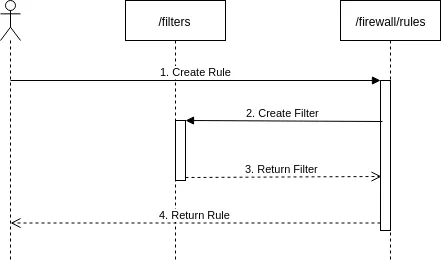
An example flow diagram
```

```
## Mermaid diagrams
Use Mermaid diagrams to illustrate product or process flows. If they work for your use case, Mermaid diagrams are preferable to other [diagrams](https://developers.cloudflare.com/style-guide/documentation-content-strategy/component-attributes/diagrams/) because they are more easily searchable and changeable.
Our Mermaid diagrams are based on [rehype-mermaid ↗](https://github.com/remcohaszing/rehype-mermaid/) and [mermaid ↗](https://www.npmjs.com/package/mermaid).
### Template
flowchart LR
accTitle: Tunnels diagram
accDescr: The example in this diagram has three tunnel routes. Tunnels 1 and 2 have top priority and Tunnel 3 is secondary.
subgraph Cloudflare
direction LR
B[Cloudflare
data center]
C[Cloudflare
data center]
D[Cloudflare
data center]
end
A((User)) --> Cloudflare --- E[Anycast IP]
E[Anycast IP] --> F[/Tunnel 1 /
priority 1/] --> I{{Customer
data center/
network 1}}
E[Anycast IP] --> G[/Tunnel 2 /
priority 1/] --> J{{Customer
data center/
network 2}}
E[Anycast IP] --> H[/Tunnel 3 /
priority 2/] --> K{{Customer
data center/
network 3}}
```
```mermaidflowchart LRaccTitle: Tunnels diagramaccDescr: The example in this diagram has three tunnel routes. Tunnels 1 and 2 have top priority and Tunnel 3 is secondary.
subgraph Cloudflaredirection LRB[Cloudflare
data center]C[Cloudflare
data center]D[Cloudflare
data center]end
A((User)) --> Cloudflare --- E[Anycast IP]E[Anycast IP] --> F[/Tunnel 1 /
priority 1/] --> I{{Customer
data center/
network 1}}E[Anycast IP] --> G[/Tunnel 2 /
priority 1/] --> J{{Customer
data center/
network 2}}E[Anycast IP] --> H[/Tunnel 3 /
priority 2/] --> K{{Customer
data center/
network 3}}```
```
## Related components
* [Screenshots](https://developers.cloudflare.com/style-guide/documentation-content-strategy/component-attributes/screenshots/)
```json
{"@context":"https://schema.org","@type":"TechArticle","@id":"https://developers.cloudflare.com/style-guide/documentation-content-strategy/component-attributes/diagrams/#page","headline":"Diagrams · Cloudflare Style Guide","description":"Create and format diagrams in documentation.","url":"https://developers.cloudflare.com/style-guide/documentation-content-strategy/component-attributes/diagrams/","inLanguage":"en","image":"https://developers.cloudflare.com/cf-twitter-card.png","dateModified":"2026-04-24","publisher":{"@type":"Organization","name":"Cloudflare","url":"https://www.cloudflare.com/"},"isPartOf":{"@type":"WebSite","@id":"https://developers.cloudflare.com/#website","name":"Cloudflare Docs","url":"https://developers.cloudflare.com/"}}
{"@context":"https://schema.org","@type":"BreadcrumbList","itemListElement":[{"@type":"ListItem","position":1,"item":{"@id":"/directory/","name":"Directory"}},{"@type":"ListItem","position":2,"item":{"@id":"/style-guide/","name":"Style Guide"}},{"@type":"ListItem","position":3,"item":{"@id":"/style-guide/documentation-content-strategy/","name":"Product docs content strategy"}},{"@type":"ListItem","position":4,"item":{"@id":"/style-guide/documentation-content-strategy/component-attributes/","name":"Component attributes"}},{"@type":"ListItem","position":5,"item":{"@id":"/style-guide/documentation-content-strategy/component-attributes/diagrams/","name":"Diagrams"}}]}
```